For flying academies
Set your ground-school exams. See the whole class on one screen.
PilotsBD gives your academy its own dashboard. Set a written exam from a bank of 23,095 questions from CAAB's own suggested banks in about a minute, and let your cadets sit it under exam conditions on their own tablets or laptops.
No installation, no server, nothing for the academy to pay. Below is every screen of it.
23,095
Practice questions, from the banks CAAB itself suggests for these exams.
Every one explained
In English and in Bangla, so a cadet learns the reasoning rather than the letter.
Set exams in a minute
Pick a subject, tick the chapters you taught this week, pick a batch.
Track every cadet
Every mark they have, across every exam you set, in one table.
01
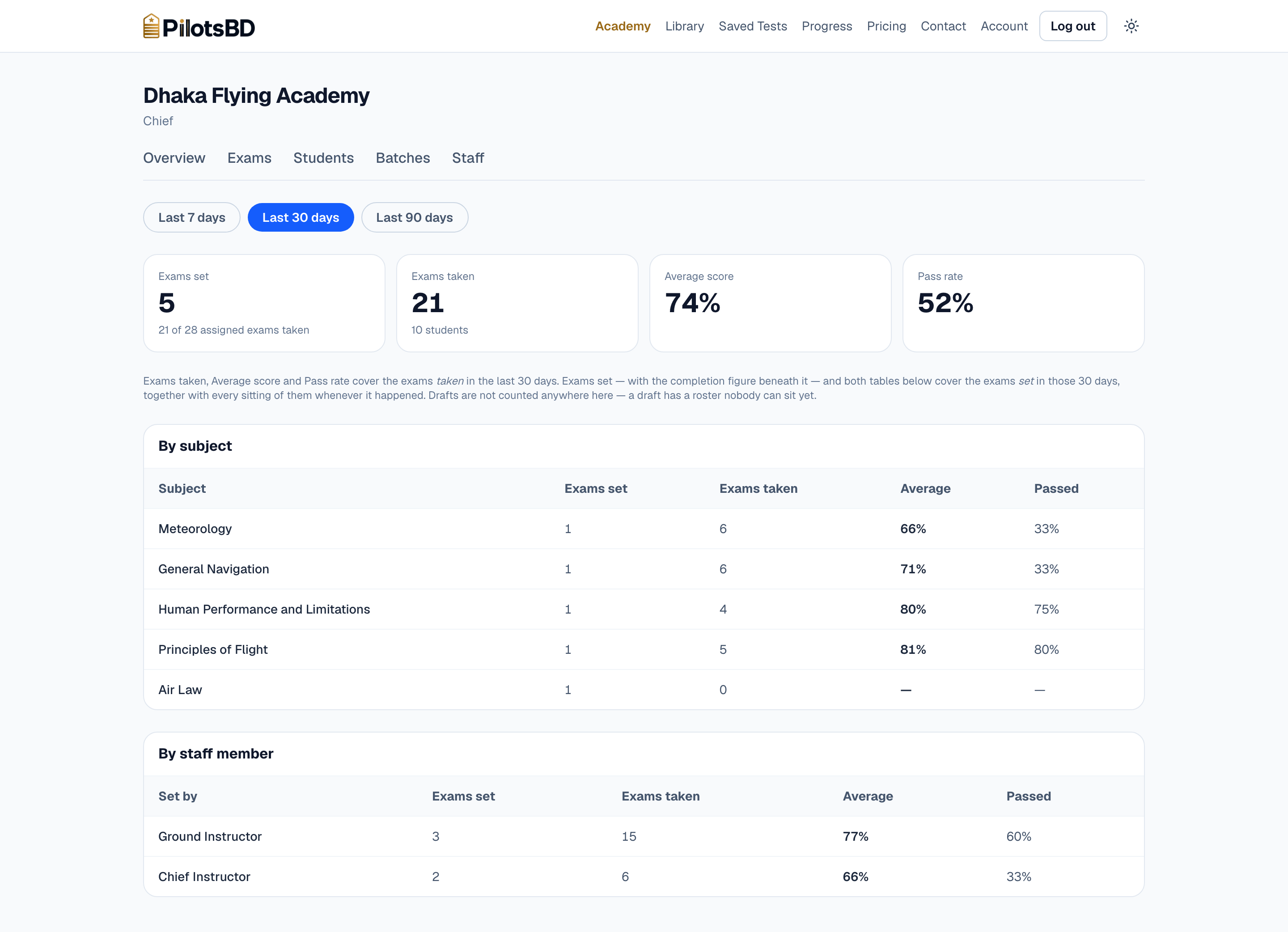
Where the class is weakest, on the first screen
Four figures over the last 7, 30 or 90 days, then the same figures broken down by subject and by the instructor who set the paper.
A Chief opening this on a Thursday sees Meteorology running at 66% against Principles of Flight at 81% — and knows what next week's ground school has to cover without asking anybody.
02
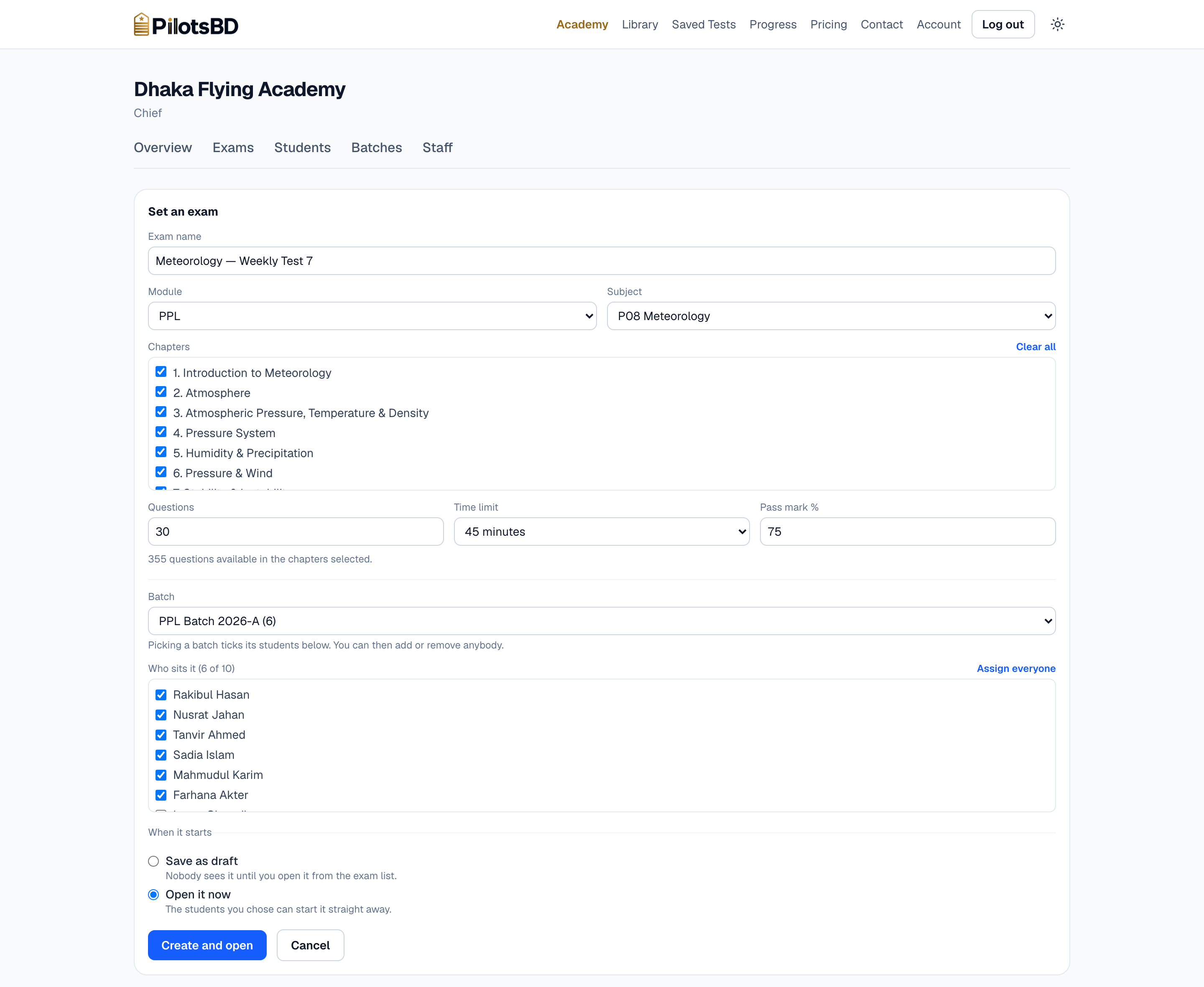
Set an exam in about a minute
Pick the subject, tick the chapters you actually taught this week, choose a length, a time limit and a pass mark, then pick a batch — which ticks its students for you, and you can still add or remove anybody.
The paper is drawn fresh for each student when they press Start, so no two cadets in the room get the same questions in the same order.
03
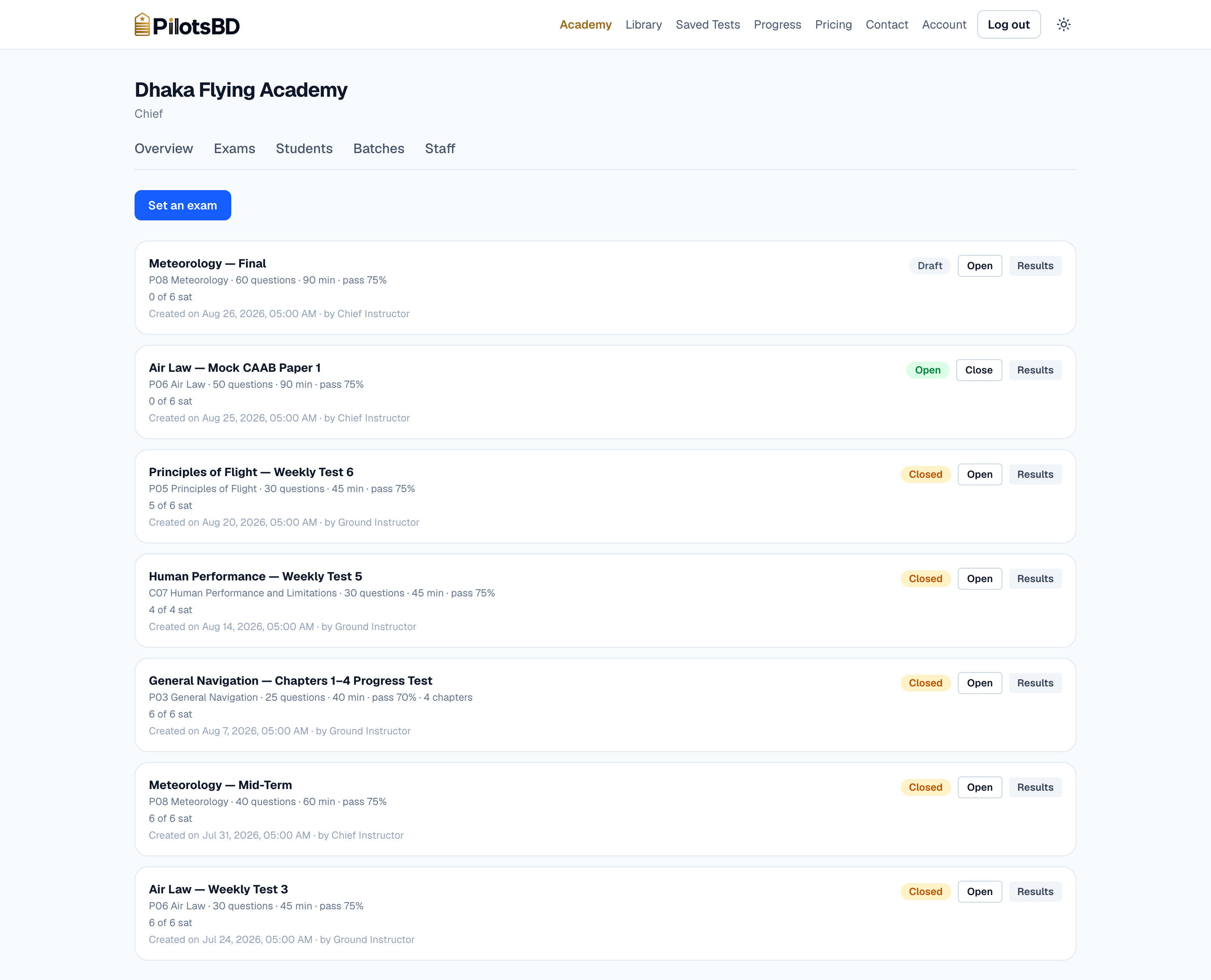
Set it now, open it when the class sits down
A new exam starts as a draft, and a draft is invisible to students — you can build next month's mock in front of the class without the class seeing it appear.
One button opens it, one closes it, and every row says how many of the students you assigned have actually sat it.
04
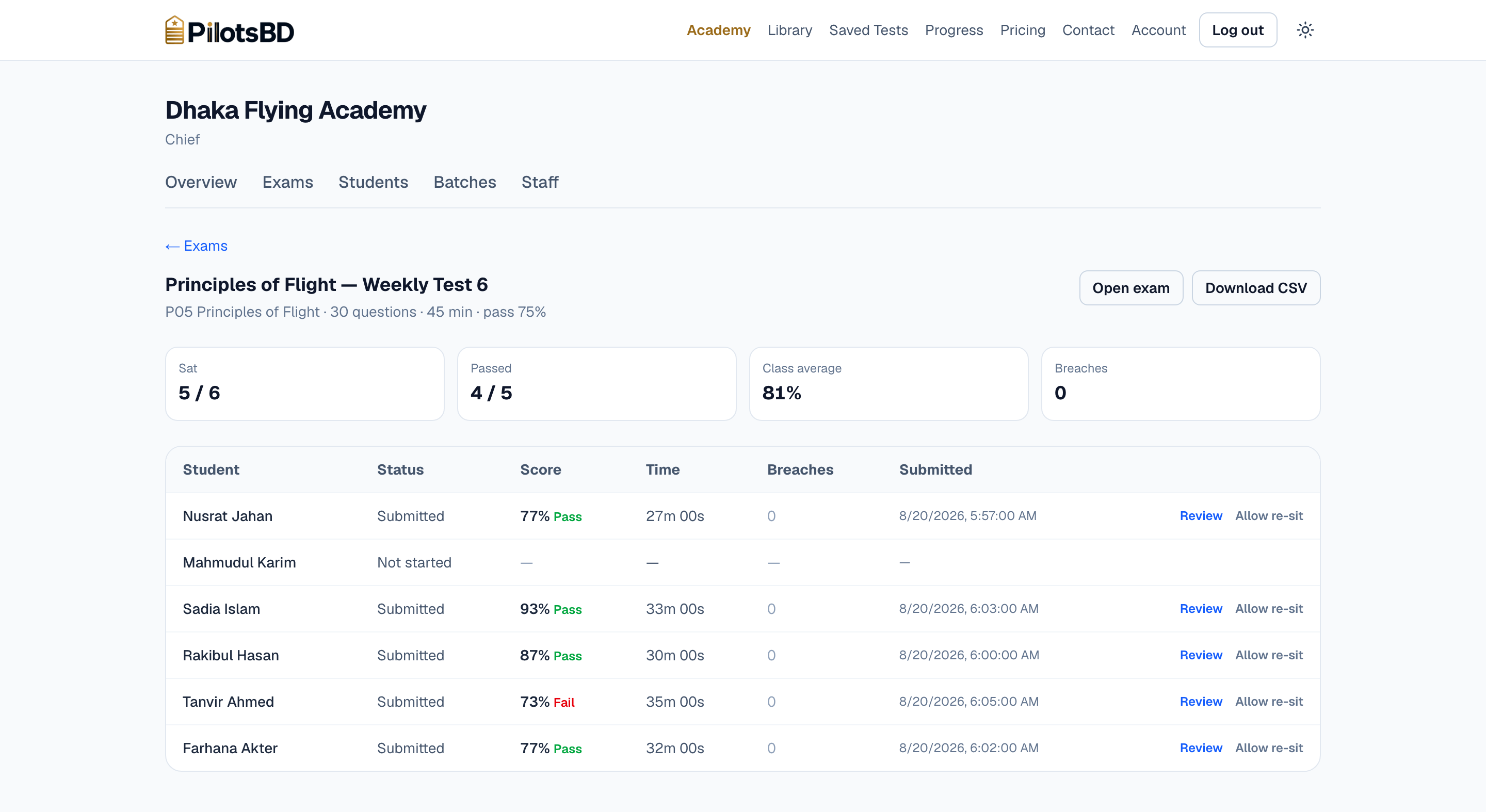
Check the stats of the exam
Score, pass or fail against your own pass mark, time taken, and anyone who never started — the row that is easiest to miss on paper and hardest to miss here.
Download the whole table as CSV for your records, and allow a re-sit with one click when a laptop dies mid-paper. The earlier attempt is kept as evidence rather than deleted.
05
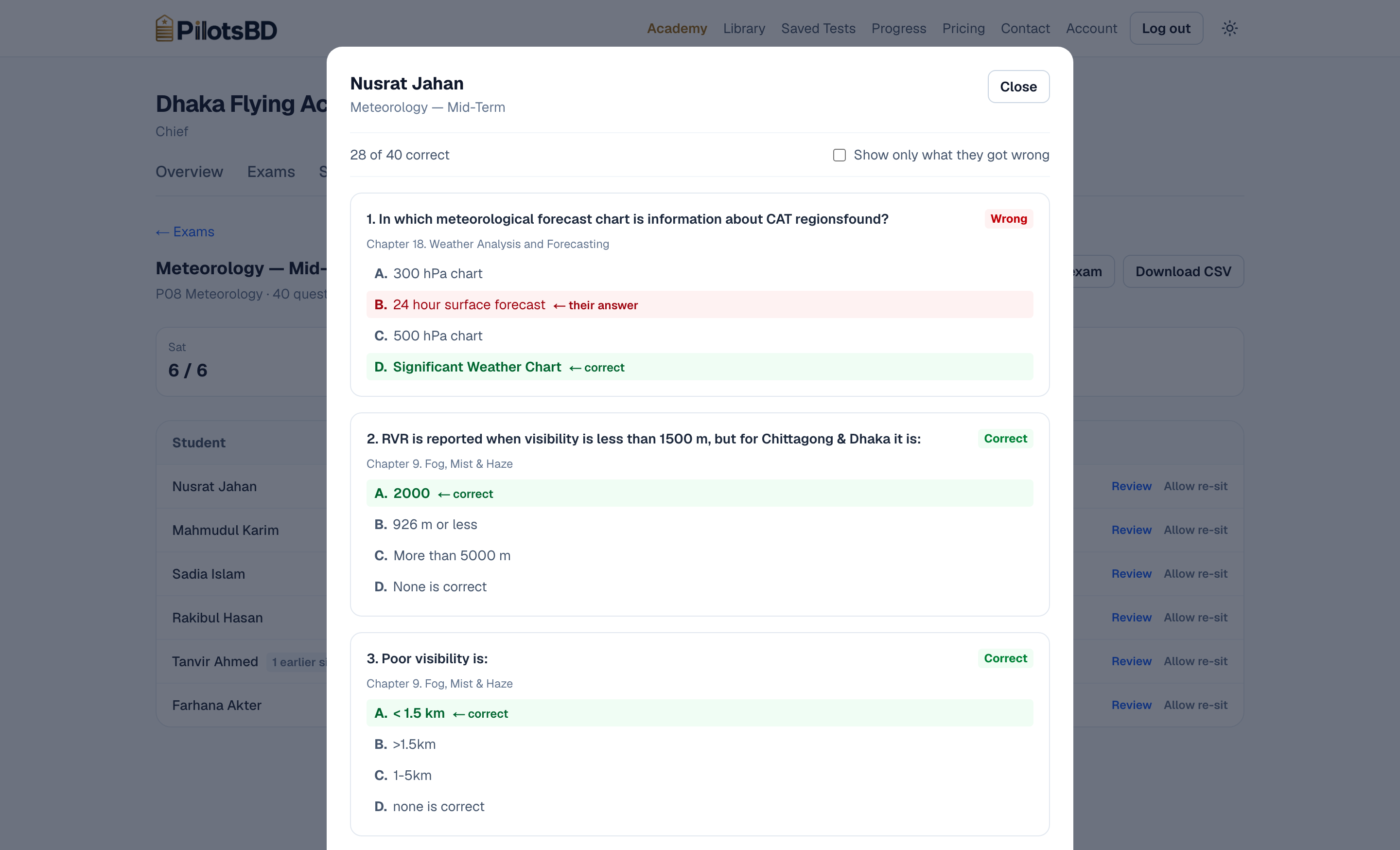
Open any paper and see exactly what they got wrong
Question by question: what the cadet picked, what the right answer was, and which chapter of the syllabus it came from.
One tick box hides everything they got right, which turns a thirty-question paper into a two-minute conversation about the four they missed.
06
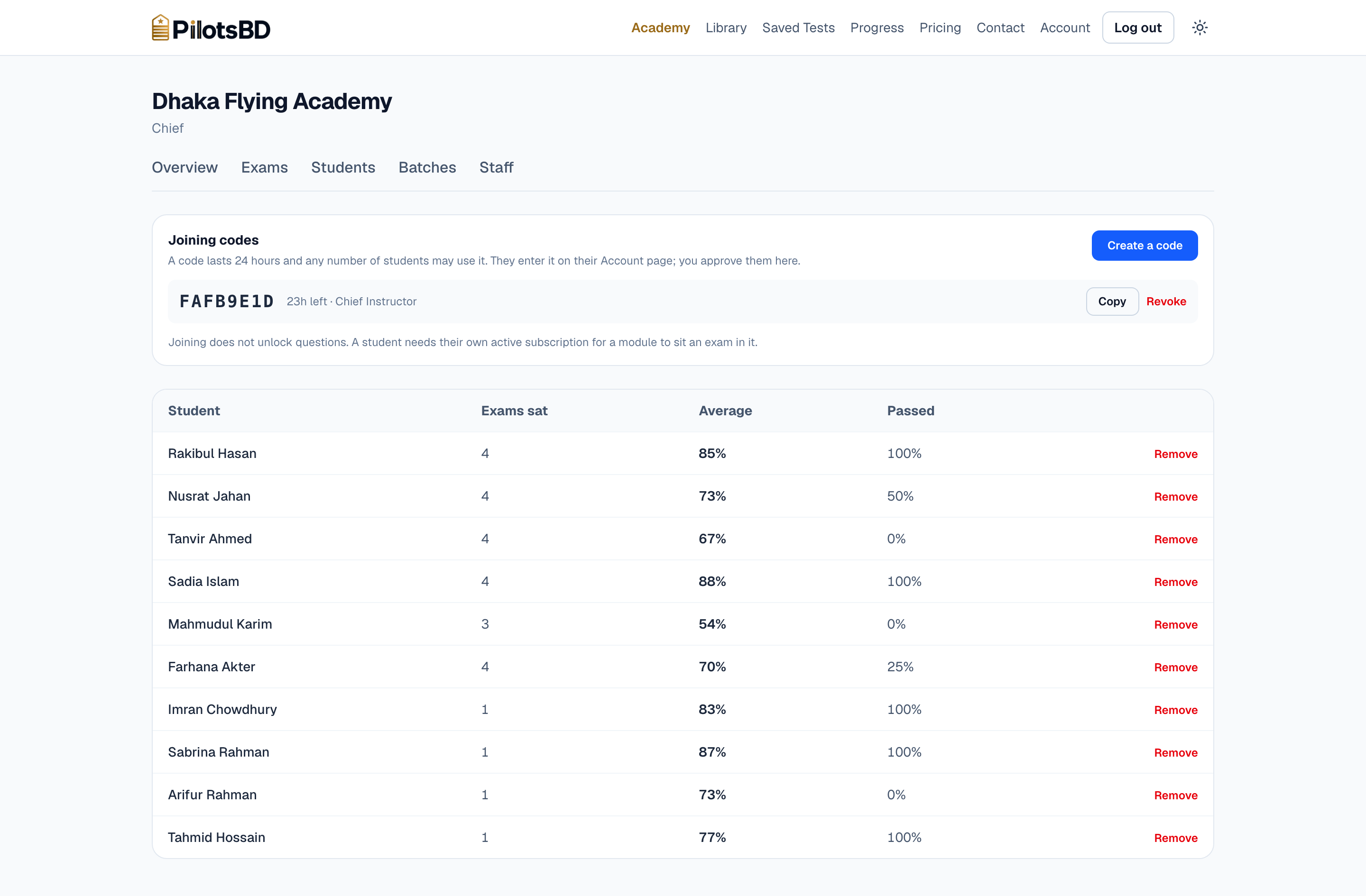
Students join with a code, and you approve them
Read a code out in class. It lasts 24 hours, any number of students may use it, and nobody becomes a member of your academy until a member of your staff approves them.
Underneath is every cadet's record across every exam you have ever set — exams sat, average, pass rate — so a progress meeting needs no spreadsheet.
07
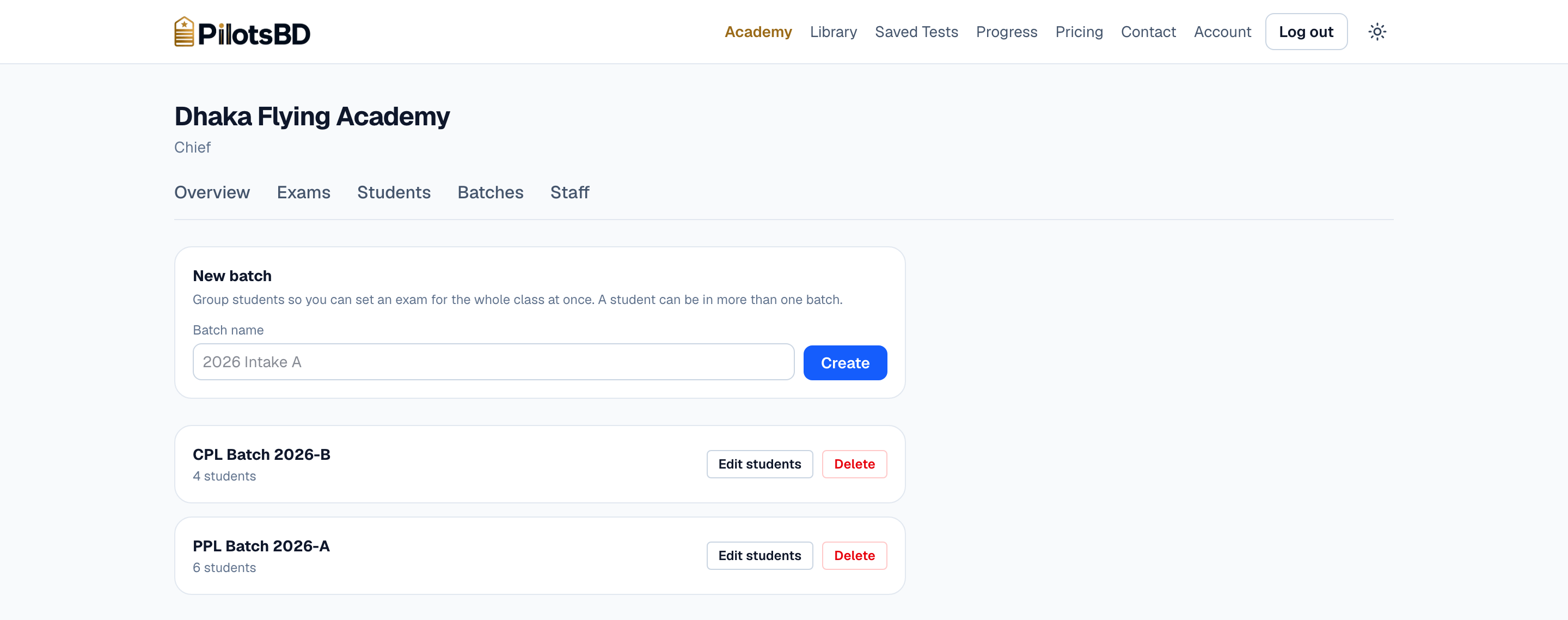
Group a batch once, then set exams to it
“PPL Batch 2026-A”, “CPL Batch 2026-B” — name them the way your academy already does. A student can be in more than one.
A batch is a shortcut, not a rule: it fills in the exam's student list and nothing more, so an exam's roster can never change under it halfway through a term.
08
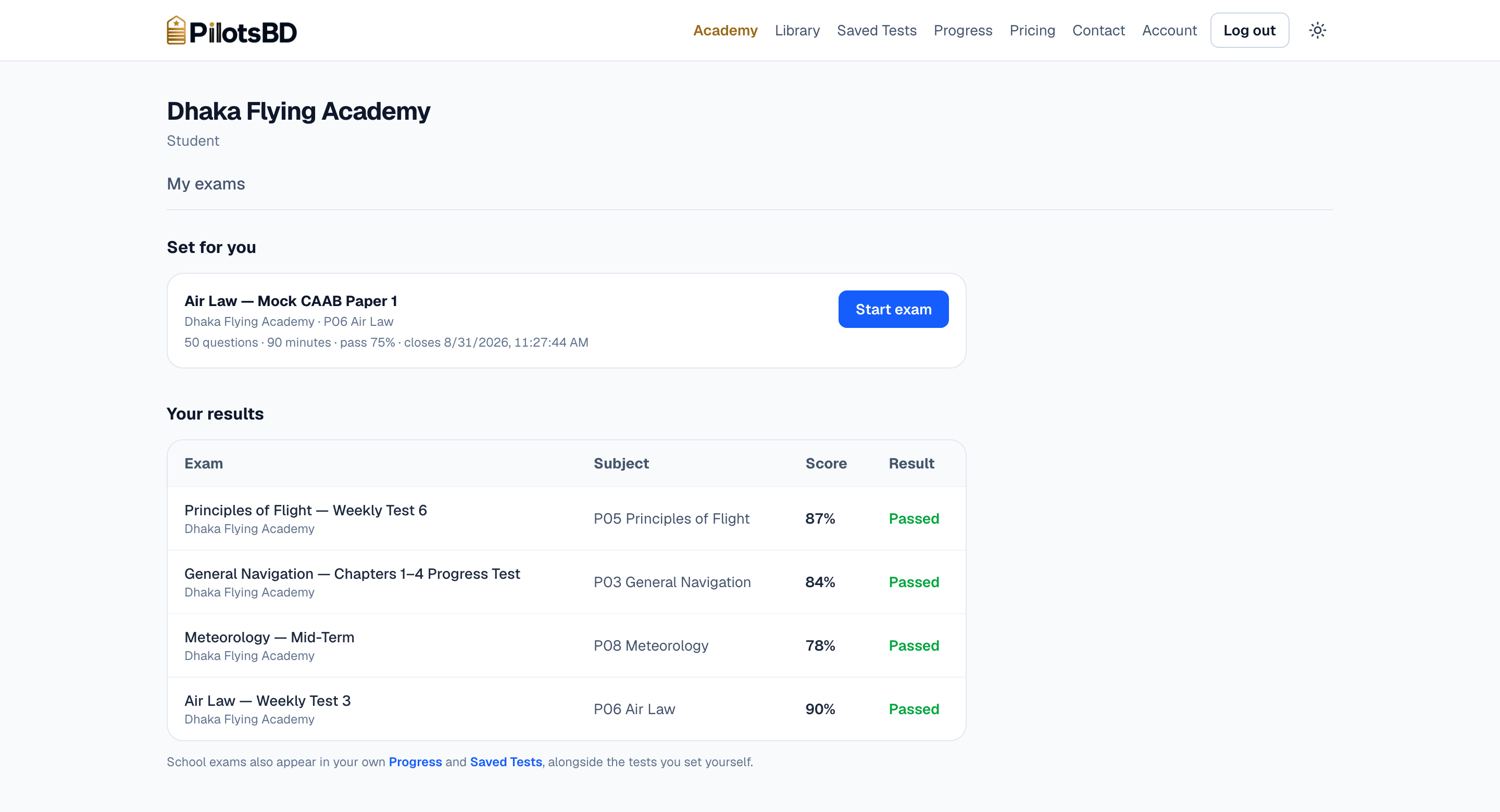
What your cadet sees
One page: the exams set for them, and every mark they have. Nothing to install and nothing to configure — they sign in on the tablet or laptop they already have.
Their school exams also land in their own progress and saved tests, beside the practice they do on their own time.
09
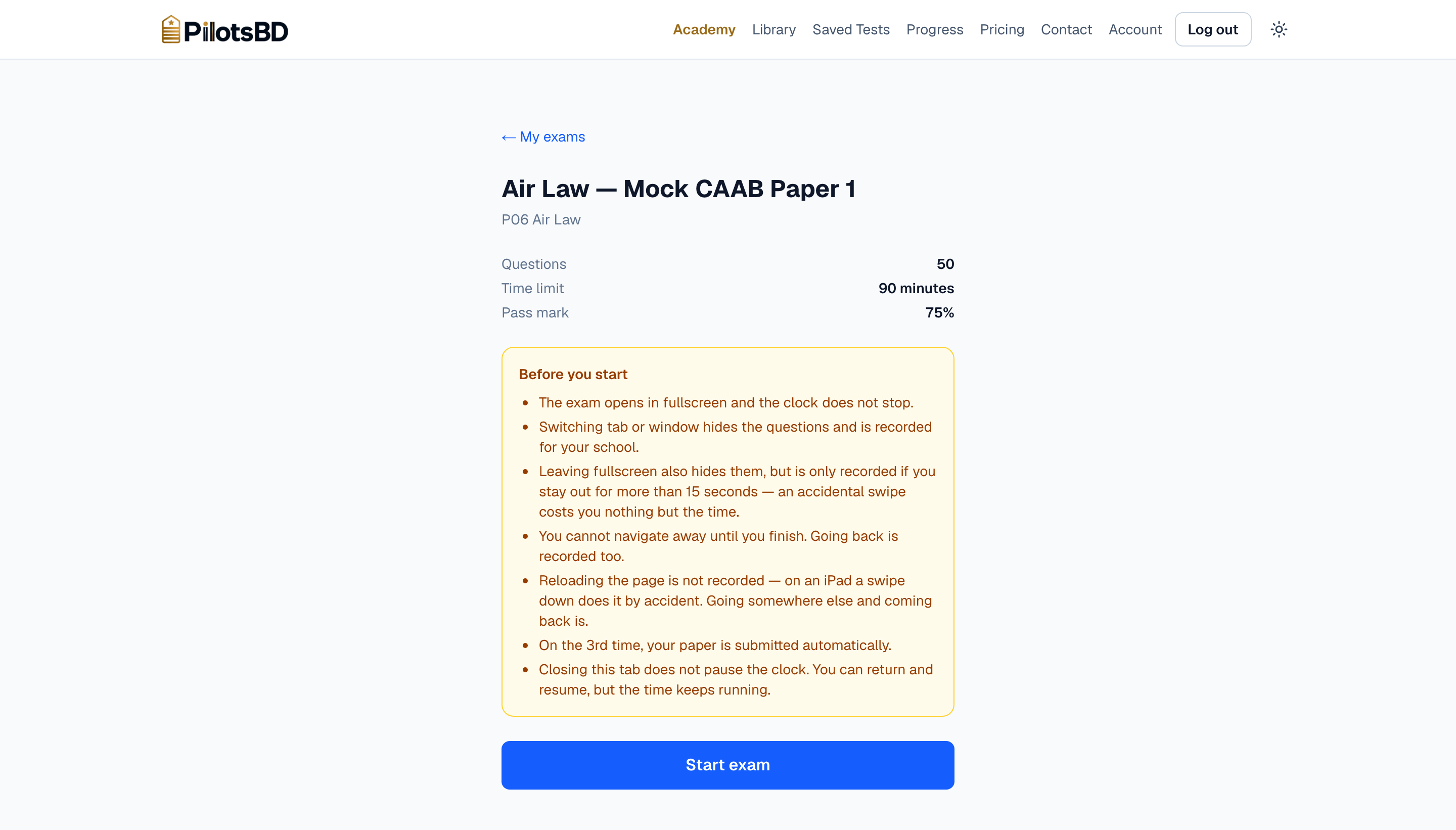
Sat under exam conditions, with the rules said out loud
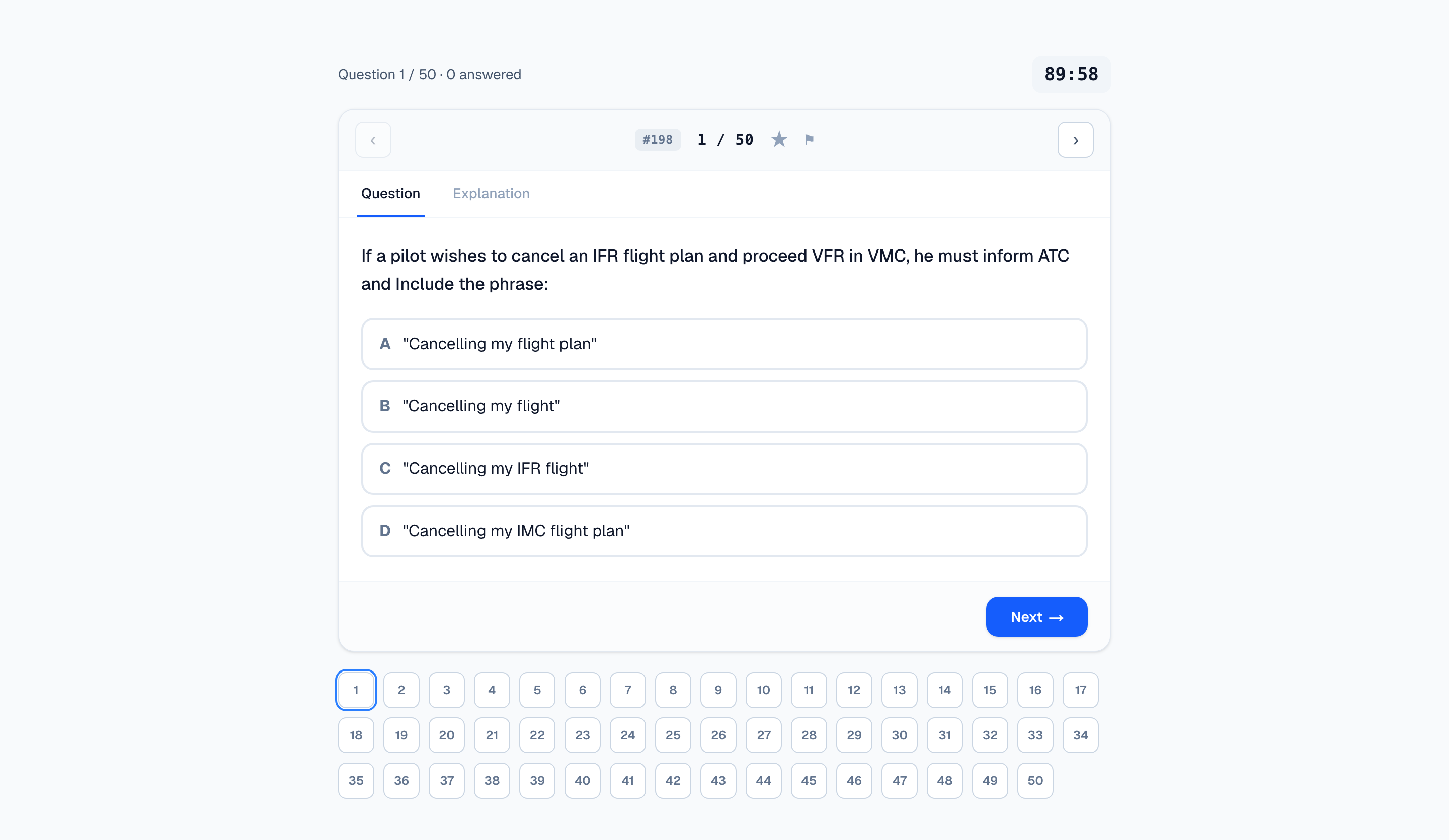
The paper opens in fullscreen, the clock runs on our server rather than in the browser, and switching tab or window hides the questions and is recorded for you. On the third breach the paper submits itself.
Explanations stay locked until the cadet finishes. An accidental swipe out of fullscreen costs them fifteen seconds and nothing else — we would rather forgive a slip than fail an honest student.
It deters; it is not a proctor. We say so on the page the student agrees to, and we will say it to you too.
Before you ask
Straight answers
What does the academy pay?
Nothing. The dashboard, the batches, the exams and the results are free to the school.
Your students hold their own PilotsBD subscriptions, the same ones any student pilot in Bangladesh buys — see the prices.
Can students use unfair means during the exam?
Not easily, and not quietly. Every cadet gets a different draw of questions in a different order, the paper runs in fullscreen, explanations stay locked until they finish, and they cannot leave the screen until they have submitted their answers — every attempt to leave is recorded on their result row, and on the third the paper submits itself.
What a browser cannot do is watch the room. A phone under the desk is still your invigilator's job, and we would rather say that than let you find it out during a mock.
Where do the questions come from?
The question banks CAAB itself suggests for these exams, together with the standard ATPL ground-training textbooks — sorted by subject and chapter, every one checked and explained.
Who can see our results?
Your own staff. Instructors see the school's exams and marks; only the Chief sees the comparison between instructors.
Staff roles are set by us, on your instruction, so nobody at your school can quietly promote themselves.
About the school in these pictures
“Dhaka Flying Academy” does not exist. We built it so these screenshots could be of a school that has been running for five weeks instead of an empty table, and the ten cadets in it are invented — no real student is named anywhere on this page.
Everything else is real. The questions are the ones in the live bank, the answers were scored against them by the same code that will score your students, and every screen above is the screen your Chief Instructor would open.
If you would rather look around a school of your own than at our pictures, ask and we will set one up for you.
Try it with one batch.
Set one weekly test on PilotsBD instead of on paper and see how much time it saves you — and how much easier it makes a decision about your ground school.